Composer
Slidescomposer is the package manager for PHP projects. It downloads
packages to the vendor/ folder inside your PHP project.
There is a second level of dependencies: extension for the PHP engine.
These are written in C and handled by pecl or pie.
Dependencies
Section titled “Dependencies”Reusing code is a determining factor when it comes to the productivity of a programmer. We refer to other people’s code we reuse as a “dependency” since our program depends on it.
Using a dependency always carries a risk.
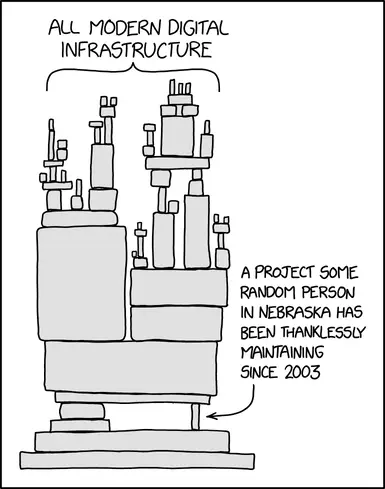
Visualisation of modern software development in xkcd.com/2347
Extensions to php
Section titled “Extensions to php”To see which extension are installed for php, run php -i on the
commandline or use <?php phpinfo(); in a php program.
Examples of extensions:
- pdo Database abstraction interface
- pdo_pgsql PostgreSQL driver for PDO
- gd Dynamic image creation and manipulation
- mbstring Multibyte string processing (UTF-8, etc.)
- ds Data Structures
Search an Extension with Pie
Section titled “Search an Extension with Pie”pie is a command line tool for installing extensions.
For example: to install the ds extension that adds data structures like Vector, Map, Set, Collection to php first search for ds to find the full name:
$ pie search ds🥧 PHP Installer for Extensions (PIE) 1.5.1, from The PHP FoundationFound 1 package(s) matching "ds":- php-ds/ext-ds (provides extension: ds): An extension providing efficient internal data structures as an alternative to arraysInstall an Extension with Pie
Section titled “Install an Extension with Pie”$ pie install php-ds/ext-ds🥧 PHP Installer for Extensions (PIE) 1.5.1, from The PHP FoundationFound package: php-ds/ext-ds:v2.0.0 which provides ext-dsExtracted php-ds/ext-ds:v2.0.0 source to: /Users/bjelline/.pie/php8.5_458f419c/vendor/php-ds/ext-dsBuild complete: /Users/bjelline/.pie/php8.5_458f419c/vendor/php-ds/ext-ds/modules/ds.soInstall complete: /opt/homebrew/lib/php/pecl/20250925/ds.so✅ Extension php-ds/ext-ds:v2.0.0 is enabled and loaded in /opt/homebrew/Cellar/php/8.5.11/bin/phpWhat happened here? Pie did several steps:
- downloaded the C source code
- compiled and built the c source code into
ds.so, a dynamic shared object binary - moved the file to PHPs extension folder
- added one line to the configuration file
php.ini:extension="ds.so"
Extensions need to be installed on the server
Section titled “Extensions need to be installed on the server”When you deploy your app, make sure that the same extensions
are also deployed on the server. Check phpinfo().
PHP Packages and Composer
Section titled “PHP Packages and Composer”Composer handles packages written in PHP. They have a two-part name, for example
fakerphp/faker. The first part is the “vendor” and the second part the project name.
When a new version of a package is published it is given a new Version number using
semantic versioning.
Information about all PHP packages is collected on packagist.org. There
you can see that version 1.24.1 of faker was published in November 2024.
You could also run a private copy of packagist, for example if your company has high security standards.
Where are packages installed
Section titled “Where are packages installed”They are installed inside your project folder:
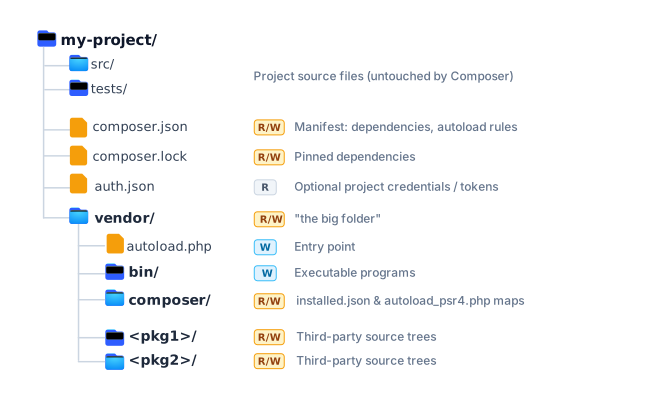
First step: composer.json
Section titled “First step: composer.json”As the first step in a new project we need to write the composer.json file,
to specify the packages we want to use.
The same file is also used to create a package. So we also have to decide on
a vendor and package name for our own project. Here is an example, created
with composer init, that requires just one package: fakerphp/faker.
The file composer.json must be committed to git.
{ "name": "bjelline/fakefriends", "description": "create a list of fake friends", "type": "project", "require": { "fakerphp/faker": "^1.24" }, "autoload": { "psr-4": { "Bjelline\\FakeFriends\\": "src/" } }, "authors": [ { "name": "Brigitte Jellinek", "email": "brigitte.jellinek@fh-salzburg.ac.at" } ]}Installing Dependencies
Section titled “Installing Dependencies”When you first run composer install the number of packages
installed might surprise you. To continue with the example above:
$ composer installNo composer.lock file present. Updating dependencies to latest.Loading composer repositories with package informationUpdating dependenciesLock file operations: 3 installs, 0 updates, 0 removals - Locking fakerphp/faker (v1.24.1) - Locking psr/container (2.0.2) - Locking symfony/deprecation-contracts (v3.7.1)Writing lock fileInstalling dependencies from lock file (including require-dev)Package operations: 3 installs, 0 updates, 0 removals - Installing symfony/deprecation-contracts (v3.7.1): Extracting archive - Installing psr/container (2.0.2): Extracting archive - Installing fakerphp/faker (v1.24.1): Extracting archive1 package suggestions were added by new dependencies, use `composer suggest` to see details.Generating autoload filesWhat was installed?
Section titled “What was installed?”composer install created several sub-folders in vendor/:
$ du -h -s vendor/*4K vendor/autoload.php80K vendor/composer11M vendor/fakerphp28K vendor/psr20K vendor/symfonyThe folder vendor/ should NOT be committed to git.
Why did this happen? When you look inside vendor/fakerphp/faker/composer.json you
find:
"require": { "php": "^7.4 || ^8.0", "psr/container": "^1.0 || ^2.0", "symfony/deprecation-contracts": "^2.2 || ^3.0"}So faker said it needed three more dependencies to work.
What is locking?
Section titled “What is locking?”For every dependency that is required in a composer.json file you can define conditions on the version number:
"fakerphp/faker": "^1.24"With one dependency requiring another, and that requiering another again, this turns into a tree or - more likely - a graph of dependencies:
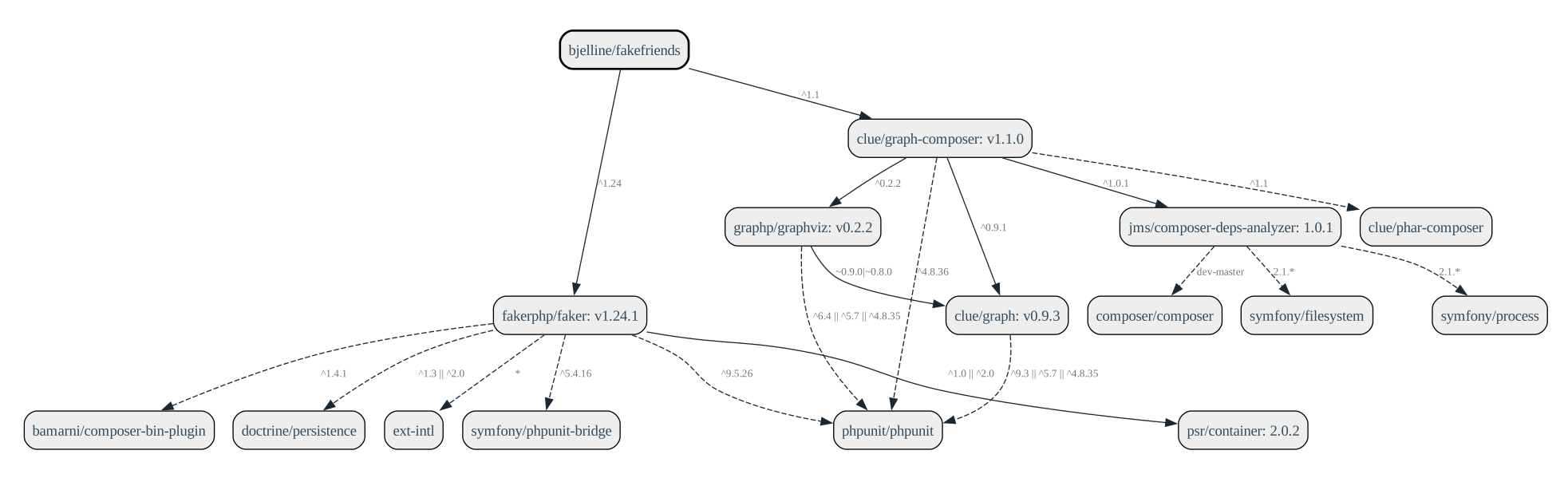
Composer does not just blindly install the newest package, it needs to find
the right version of each package so that all conditions can be fulfilled.
The versions actually used and installed are written to the composer.lock file.
The file composer.lock must be committed to git. This ensures, that all developers
on a project and the production server use the exact same version of each package.
Final Quiz
Section titled “Final Quiz”You start a new PHP project and want to install packages with Composer. Which file must you create first?
-
composer.json -
package.json -
requirements.txt -
Gemfile
Your script fails with Class "Faker\Factory" not found. What is the most likely cause?
-
composer.lockis not committed to git or was never written -
vendor/autoload.phpis not required, or the package was never installed - The
dsextension is not installed or not enabled inphp.ini -
composer.jsonhas noauthorsfield or a syntax error
A teammate clones the repo and starts the script, but it fails. Which command fixes it?
-
composer init -
composer dump-autoload -
composer install -
pie install fakerphp/faker
Why is vendor/ not in the repository?
- It is rebuilt from
composer.lockwithcomposer install - Licenses forbid storing third-party PHP code in git
- PHP creates it automatically on first run
- Packages live globally in
~/.composer, andvendor/is only a symlink
vendor/ was committed to git. What is the correct fix?
- Delete
composer.lock - Only add
vendor/to.gitignore - Add
vendor/to.gitignoreand rungit rm -r --cached vendor - Run
composer updateand addvendor/to.gitignore
You and a teammate have different faker versions installed. What is the cause?
- Packagist serves random versions per user
- The
^constraint disables locking - Faker updates itself at runtime
-
composer.lockwas not committed
You edited composer.json by hand, and composer install warns: “The lock file is not up to date with the latest changes in composer.json.” What should you do?
- The JSON is invalid; run
composer validate -
vendor/must be deleted first - The lock file is outdated; run
composer update -
installnever readscomposer.json; runcomposer init
Your app works locally but fails on the server because a function from a PHP extension is missing. What is correct?
- Install the extension on the server (verify with
phpinfo()) and declare it asext-<name>inrequire -
composer require ext-dsinstalls the extension - Copy
ds.sointovendor/ - Register the extension under
autoload.files
See Also
Section titled “See Also”Answered: 0 / 0 (0%)
Correct: 0 / 0 (0%)