Laravel
SlidesThis page will introduce Laravel, the framework
After finishing this page you will
- know that Laravel is an Open Source project with commercial tooling around it
- know the philosophy behind Laravel
- be able to create a new project and find your way around the folder structure
- understand how a request travels through Laravel: entry point, routing, view
- know the basics of Blade templates and layout components
- have built a small page where Model, View, Controller and the database work together
What is Laravel
Section titled “What is Laravel”
Laravel is a web framework written in PHP. It was created by Taylor Otwell starting in 2011. It uses the “MVC” - Model - View - Controller Architecture.
The Laravel philosophy puts developer happiness above all else: Tools should be “expressive,” meaning the code is readable, elegant, and almost like writing English. Beyond the code itself, this value manifests in:
- Exceptional Documentation: A belief that a feature doesn’t exist if it isn’t documented clearly.
- Pragmatism: Choosing solutions that solve real-world problems quickly over theoretical perfection.
- Aesthetic Quality: A high standard for clean syntax and beautiful UI/UX in the ecosystem’s tools.
- A “Battery-Included” Mentality: Providing a complete ecosystem (like Forge, Vapor, and Herd) so developers can focus on building their apps rather than fighting with server configurations.
While the framework itself is Open Source, there is a commercial ecosystem of tools surrounding it. We will focus on the Open Source part.
Creating a Project
Section titled “Creating a Project”To create a new project, use the laravel installer:
$ laravel new counter

██╗       █████╗  ██████╗   █████╗  ██╗   ██╗ ███████╗ ██╗██║      ██╔══██╗ ██╔══██╗ ██╔══██╗ ██║   ██║ ██╔════╝ ██║██║      ███████║ ██████╔╝ ███████║ ██║   ██║ █████╗   ██║██║      ██╔══██║ ██╔══██╗ ██╔══██║ ╚██╗ ██╔╝ ██╔══╝   ██║███████╗ ██║  ██║ ██║  ██║ ██║  ██║  ╚████╔╝  ███████╗ ███████╗╚══════╝ ╚═╝  ╚═╝ ╚═╝  ╚═╝ ╚═╝  ╚═╝   ╚═══╝   ╚══════╝ ╚══════╝
┌ Do you want to use a starter kit? ───────────────────────────┐│ No                                                           │└──────────────────────────────────────────────────────────────┘
┌ Which frontend stack do you want to build on? ───────────────┐│ Blade                                                        │└──────────────────────────────────────────────────────────────┘
• Creating Laravel application  ✔ Application installed  ✔ Application initialized
....┌ Application ready ───────────────────────────────────────────┐│ You can start your local development using:                  ││                                                              ││ 1. cd counter                                                ││ 2. composer run dev                                          │└──────────────────────────────────────────────────────────────┘
Laravel Folder Structure
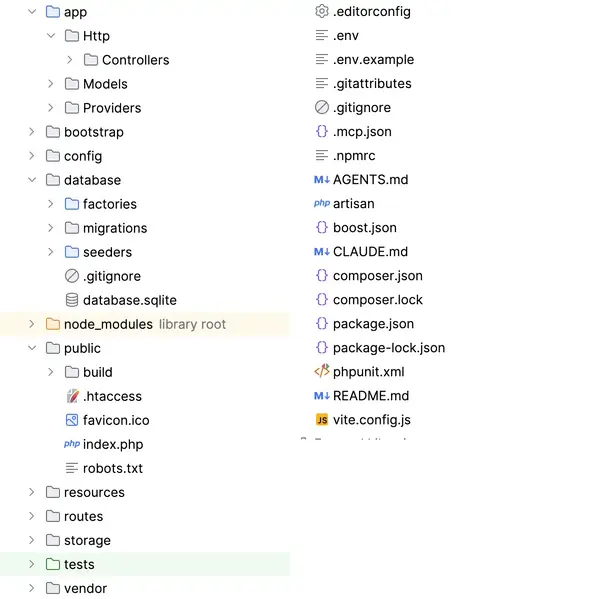
Section titled “Laravel Folder Structure”laravel new creates many files and many folders. We will go through them
in this chapter.
The README.md
Section titled “The README.md”When you start a new project, the README.md contains a description of Laravel. Immediately empty the file and write a short description of your own project.
The Secrets
Section titled “The Secrets”Laravel reads a lot of configuration including passwords and API-tokens
from a file .env. (This replaces config.php.)
A configuration example: If your project is in
a different language than English you might want to change these entries in .env,
for example to de and de_AT.
APP_LOCALE=enAPP_FALLBACK_LOCALE=enAPP_FAKER_LOCALE=en_US.env contains the database configuration.
DB_CONNECTION=sqlite# DB_HOST=127.0.0.1# DB_PORT=3306# DB_DATABASE=laravel# DB_USERNAME=root# DB_PASSWORD=The default database in local development is SQLite.
You can find the database file in counter/database/database.sqlite.
When you are working on a project that uses PostgreSQL in production you will
want to switch local development to use PostgreSQL also. .env is where you do this.
The Static Website
Section titled “The Static Website”The folder public is directly accessible on the web.
It contains index.php as the entrypoint, and static files
like robots.txt and favicon.ico.
The Frontend
Section titled “The Frontend”Laravel uses npm and Vite to build the frontend. You will find a few files and folders related to that:
- package.json
- package-lock.json
- vite.config.js
- .npmrc
- node_modules
Artisan and Composer
Section titled “Artisan and Composer”When working with Laravel you will often type commands on the command line:
composerfor installing packages. it can also run scripts for starting the server or running testsartisanfor generating code or using the interactivetinkerenvironment
composer is installed globally, not in your project. artisan is a small php
script in the root folder of your project.
AI Tooling
Section titled “AI Tooling”Laravel comes with a lot of configuration for AI usage, including an mcp server for working with the framework. These files and folders are part of the boost package.
- folder
.ai- general boost settings - folder
.agents- universal agent definitions and task files adhering to emergent open agent patterns - folders
.claude,.codex,.cursor,.junie,.kiro- for specific vendors - file
AGENTS.md - file
.mcp.json- registers the serverphp artisan boost:mcp, allowing connected agents to inspect database schemas, read logs, run routes, and query the documentation API in real time
Git Files
Section titled “Git Files”Laravel creates .gitignore, .gitattributes, and in some folders empty .gitkeep files to make sure the
folders exists, even if there are no files yet.
Request Lifecycle
Section titled “Request Lifecycle”You can start the laravel server with composer run dev
and interact with the server on http://localhost:8000
Let’s follow a GET-Request through the Laravel framework.
Entry Point
Section titled “Entry Point”The folder public is in the webspace. You can find a file public/.htaccess with rewrite rules that direct
every request to the index file.
The file public/index.php is the entry point.
In index.php the autoloader is called first, loading all the dependencies.
Then it hands off to bootstrap/app.php.
In app.php we see three stages: routing, middleware, and finally exception handling.
For a normal web request, routing hands off to routes/web.php, which decides
what should happen next.
Routing
Section titled “Routing”The file routes/web.php will contain a lot of information in a full app.
It starts out with just one route that directly renders a view:
Route::get('/', function () { return view('welcome');});Find the welcome view in resources/views/welcome.blade.php.
Blade is the template system of Laravel. The blade-files are compiled
to optimized php files automatically.
Blade Syntax
Section titled “Blade Syntax”The Syntax of blade uses double curly braces (also called “mustache”) for
output. It is automatically run through htmlspecialchars:
<h1>{{ 2 + 2 }}</h1>The @ sign is used for control statements like if:
@if ($user->isAdmin()) <span class="badge">Administrator</span>@elseif ($user->isModerator()) <span class="badge">Moderator</span>@else <span class="badge">Standard User</span>@endifThe Welcome View
Section titled “The Welcome View”The default welcome view that comes with Laravel consists of a lot of Tailwind classes, a few html tags, and only one or two lines of blade syntax.
It is also a self contained html file, which is unusual for a view.
A New Page
Section titled “A New Page”Let’s create a new homepage! Again we will walk through the Laravel framework following the request from the browser.
Move The Old Homepage Aside
Section titled “Move The Old Homepage Aside”First move the old homepage to a different URL in routes/web.php:
Route::get('/', function () { return view('counter');});Route::get('/welcome', function () { return view('welcome');});When you reload the browser pointed at http://localhost:8000/ you get an error message:
InvalidArgumentException - Internal Server ErrorView [counter] not found.Create a View
Section titled “Create a View”In Laravel there is the right folder and right filename for every piece of the app. You never create them by hand, but use a generator:
$ php artisan make:view counterINFO View [resources/views/counter.blade.php] created successfully.The path and filename is correct. The created view is simple and does not contain a complete html document:
<div> <!-- You must be the change you wish to see in the world. - Mahatma Gandhi --></div>The parts of the html that will be the same for every view are stored in a different place.
Create a Layout Component
Section titled “Create a Layout Component”Reusable parts of a view are called components. We will start with an anonymous (classless) component named layout:
$ php artisan make:component --view layoutINFO View [resources/views/components/layout.blade.php] created successfully.In the blade file of the component: resources/views/components/layout.blade.php:
@props(['title' => 'Counter App'])<html> <head> <title>{{ $title }}</title> <link rel="stylesheet" href="https://cdn.simplecss.org/simple.min.css"> </head> <body> {{ $slot }} </body></html>Use the Layout Component
Section titled “Use the Layout Component”In the counter view:
{{-- resources/views/counter.blade.php --}}<x-layout title="Counter App: The Current Count"> <h1>Counter</h1> <p>the current count is</p> <p style="font-size: 120px;">{{ 42 }}</p></x-layout>We created a new page with a fake counter.
Use the Database
Section titled “Use the Database”To count visits in the database we need three parts: a Model, a Controller, and a migration to create the database table. All three can be created with one maker:
php artisan make:model Visit -mcINFO Model [app/Models/Visit.php] created.INFO Migration [database/migrations/2026_10_01_101937_create_visits_table.php] created.INFO Controller [app/Http/Controllers/VisitController.php] created.The Migration
Section titled “The Migration”A migration describes a change in the database schema. We will be saving the ip address of the request and not much more:
Schema::create('visits', function (Blueprint $table) { $table->id(); $table->string('ip'); $table->timestamps();});At this time, the database and the table do not exist yet.
Running the Migration
Section titled “Running the Migration”On the command line run:
$ php artisan migrateINFO Running migrations.2026_10_01_101937_create_visits_table ................. 2.29ms DONENow the database table exists, and we can try to use it.
Currently we are faking the counter in the view:
<p>the current count is</p> <p style="font-size: 120px;">{{ 42 }}</p>let’s show a variable here instead:
<p>the current count is</p> <p style="font-size: 120px;">{{ $count }}</p>This gives an error:
ErrorException resources/views/counter.blade.php:4 Undefined variable $countRoutes
Section titled “Routes”To set the variable, we go back to the route routes/web.php
Here we set the variable:
Route::get('/', function () { $count = 43; return view('counter', compact('count'));});Congratulations: we are faking the counter from the route, and
handing the value to the view with the compact method.
Controller
Section titled “Controller”As a next step, we get the controller involved. In the routes file, remove the fake variable and instead call the controller:
Route::get('/', [VisitController::class, 'index'])->name('home');In the controller, implement the index action:
public function index(): View{ $count = 45; return view('counter', compact('count'));}Now we are faking the counter in the controller.
Database
Section titled “Database”Finally we want to use the database itself.
To do this we need to add two use statements, for Request and ConnectionInterface.
The index method is often used without any arguments. But when you
need them, you can use $request and $db:
<?php
namespace App\Http\Controllers;
use Illuminate\Contracts\View\View;use Illuminate\Http\Request;use Illuminate\Database\ConnectionInterface;
class VisitController extends Controller{    public function index(Request $request, ConnectionInterface $db): View    {        $db->table('visits')->insert([            'ip' => $request->ip()        ]);        $count = $db->table('visits')->count();        return view('counter', compact('count'));    }}
A word of warning: This implementation does not conform to the REST principle: we are changing something on the server in a GET request.
We have not yet used the first aspect of the Model - View - Controller pattern: the model.
The model represents a table from the database as a class. Here this class is called Visit.
We need to add the ip property to the list of fillable properties:
class Visit extends Model{ protected $fillable = [ 'ip', ];Now we can change the code in the Controller to use the Model instead of the database:
use App\Models\Visit;Visit::create([ 'ip' => $request->ip(),]);$count = Visit::count();Finished
Section titled “Finished”And there we have it: Model, View, Controller, Routing, all working hand in hand. Congratulations on your first Laravel app.
Final Quiz
Section titled “Final Quiz”laravel new counter returns “command not found”. What is the cause and fix?
-
laravel newwas removed in recent Laravel versions; you must usecomposer create-projectonly - The global installer isn’t installed or is not on
PATH; runcomposer global require laravel/installer - You must run
php artisan servefirst -
node_modulesis missing; runnpm install
You’ve just run laravel new counter. How do you run and see the app locally?
-
cd counter, thencomposer run dev, openhttp://localhost:8000 -
cd counter/public, thenphp -S localhost:8000, openhttp://localhost:8000 -
laravel serve counter - Open
public/index.phpfrom the file system
You created counter.blade.php and want / to show it. What do you change?
- Rename
welcome.blade.phptocounter.blade.php - In
routes/web.php, returnview('counter')for/ - Set
APP_HOME=counterin.env - Add
<x-counter/>to the welcome view
Visiting / shows “View [counter] not found”. Why?
- The route is missing a
->name() -
resources/views/counter.blade.phpdoesn’t exist (create it withphp artisan make:view counter) - The controller wasn’t imported
-
php artisan migratehasn’t been run
You want shared <html>…</head> markup around every page. Which is correct?
- Put the HTML in
routes/web.php - Create
resources/views/layout.blade.phpand@includeit - Create an anonymous component (
php artisan make:component --view layout) and wrap each view’s content in<x-layout> - Add the HTML to
public/index.php
Your migration to create the visits table is written, but the table doesn’t exist. What creates it?
-
php artisan db:create -
php artisan migrate -
php artisan make:migration visits - It’s created automatically on first page load
The view uses {{ $count }} and errors “Undefined variable $count”. How do you fix it?
- Pass it from the route/controller:
view('counter', compact('count')) - Declare
$countas a global inbootstrap/app.php - Add
$countto the model’s$fillable - Write
{{ $count = 0 }}at the top of the Blade file
The counter increments on every homepage GET. Which principle does this break, and what’s the fix?
- Nothing; a GET may change data freely
- Statelessness; store the count in the session instead
- A GET should be safe (no state change); a state-changing action should use POST
- MVC; move the query into the view
See Also
Section titled “See Also”- Laravel Documentation
- Stauffer, M. (2023): Laravel: up and running
Answered: 0 / 0 (0%)
Correct: 0 / 0 (0%)