Migrations and Relationships
SlidesMigrations are a tool to change the database schema. Relationships between models map to relationships between database tables.
After working through this chapter you will be able to
- use migrations to create tables and add data
- use rollback to revert changes in the database
- set up relationships between models / tables correctly
Migrations
Section titled “Migrations”The problem
Section titled “The problem”When working on a project with a database the first phase is easy: you can “tear down” the whole database and start from scratch with no problem. But as soon as you have real data from real users in your production database, you need a more careful approach to schema changes.
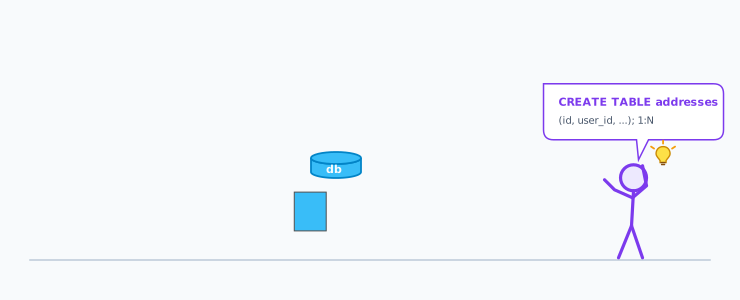
In this example the developer wants to create a new table for storing addresses. This also implies copying over the adress data that is currently stored in the users table, and dropping the columns from the user table.
The problem with teamwork
Section titled “The problem with teamwork”When building durable software the first phase is short compared to the lifetime of the project. When working in a team of developers we have the additional problem of coordinating that the changes from different developers do not interfer with each other. It is vital that changes to the database schema and changes to the code stay in sync:
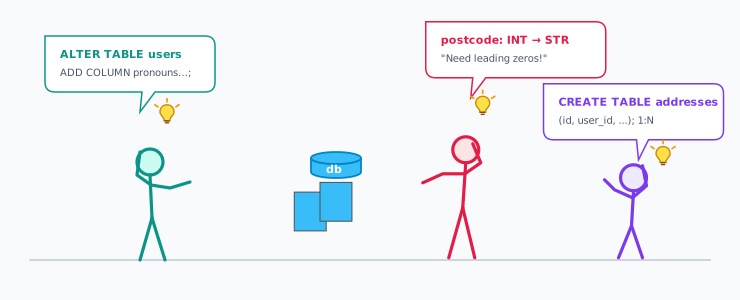
In this team of developers there are two more changes going on at the same time:
One developer wants to add a column for pronouns to the users table. Another one wants to change the postcode in the users table from an integer to a string. And the last developer still wants to extract the address data from the users table into a saperate address table.
Migration Files
Section titled “Migration Files”A migration is a file in the folder databasemigrations/. The filename contains a timestamp at the start and a
descriptive name at the end.
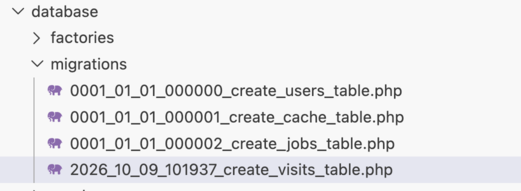
The first three files are part of the laravel framework itself, only the last file was created by the developer. Its filename contains:
- the timestamp
2026_10_09_101937 - the descriptive name
create_visits_table
These files are commited in git.
Migration Code
Section titled “Migration Code”The content of this file is a class that inherits from Migration.
It implements to methods: up() and down():
return new class extends Migration{
    public function up(): void    {    }
    public function down(): void    {    }};
the up() method
Section titled “the up() method”Inside the up() method you use the Schema:: class to create, drop, and alter tables and indexes.
Schema::create('visits', function (Blueprint $table) { $table->id(); $table->string('ip'); $table->timestamps(); $table->index('ip');});You can also use DB::statement to run abitrary queries in the database, for example for copying over
data from an existing table:
DB::statement(" INSERT INTO visits (ip, created_at, updated_at) SELECT ip, created_at, updated_at FROM logging WHERE type='visit'");the down() method
Section titled “the down() method”Inside the down() method you revert all the changes:
public function down(): void { Schema::dropIfExists('visits'); }Migrations in the database
Section titled “Migrations in the database”Inside the database there is one table that keeps track of which migrations have already been run:
sqlite> select id,migration from migrations;+----+---------------------------------------+| id | migration |+----+---------------------------------------+| 1 | 0001_01_01_000000_create_users_table || 2 | 0001_01_01_000001_create_cache_table || 3 | 0001_01_01_000002_create_jobs_table || 5 | 2026_10_09_101937_create_visits_table |+----+---------------------------------------+How migrations are run
Section titled “How migrations are run”You start a migration on the command line with artisan:
> php artisan migrateLaravel checks the folder with the migration files against the contents of the migration table. In case they are the same, nothing happens:
> php artisan migrate INFO Nothing to migrate.If there is a new migration available as a file, that is not in the database yet,
the up() method is run. If there are several files, they are run in the order of
the timestamp:
> php artisan migrate
   INFO  Running migrations.
  2026_10_30_094032_add_color_to_visits ............... 2.20ms DONE  2026_10_30_094045_add_index_to_color ................ 0.67ms DONE
How migrations fail
Section titled “How migrations fail”When you run a migration it can fail:
> php artisan migrate
   INFO  Running migrations.
  2026_10_30_094032_add_color_to_visits ................ 3.20ms FAIL
   Illuminate\Database\QueryException
  SQLSTATE[HY000]: General error: 1 Cannot add a NOT NULL column with default value NULL (Connection: sqlite, Database: /Users/bjelline/teach-dev/backend-development/counter/database/database.sqlite, SQL: alter table "visits" add column "color" varchar not null)
If the migration contains several changes, and the third failed, the first two changes
will be in the database. But the migration will not be in the “migrations” table. So when
you run php artisan migrate again, the first change will be run again and fail because it
aready exists.
So to fix this, you need to:
- clean up the changes of the “half-run” migration by hand in the database
- fix the code of the migraiton
- run
php artisan migrateagain
How migrations are reverted
Section titled “How migrations are reverted”Most migrations are reversible. For these you must implement the down() method that
exactly reverts the up() method.
> php artisan migrate
   INFO  Running migrations.
  2026_10_30_094045_add_index_to_color ................................................................................................. 6.88ms DONE
> php artisan migrate:rollback
   INFO  Rolling back migrations.
  2026_10_30_094045_add_index_to_color ................................................................................................. 4.87ms DONE
Always make sure that the rollback actually works before you commit an push it!
Migrations and code go together
Section titled “Migrations and code go together”When creating merge requests make sure that the commit includes all the migrations necessary for your code changes. For example:
- migration to add
colorto the table - view to display the color
or
- migration to split up
userstable intousersandadresses - controller and views for addresses
- changes in controller and views for users
Published migrations are immutable
Section titled “Published migrations are immutable”Once you have published a migration so that other developers can use it you can never edit the migration file!
Quiz: Migrations
Section titled “Quiz: Migrations”What does php artisan migrate do?
- runs the
up()of every migration file not yet recorded in the migrations table, in timestamp order - runs the
up()of every migration file again, from scratch - creates a new, empty migration file
- reverts the migration that ran last
How does Laravel know which migrations have already run?
- a
migrationstable in the database records every migration that has run - it compares the modification dates of the migration files
- it keeps a list in
composer.json - it runs them all every time and ignores the duplicates
What is the down() method for?
- reverting exactly what
up()did, sophp artisan migrate:rollbackcan undo the migration - running the migration a second time
- filling the new table with seed data
- deleting the migration file after it has run
Teammates have already run a migration you published, and now you need a different column type. What do you do?
- write a new migration that alters the table, and never edit the published one
- edit the original migration file and ask everyone to run it again
- delete the row from the
migrationstable, then edit the old file - edit the file and run
migrate:freshon the production database
Relationships
Section titled “Relationships”So far each model has stood alone. But real data is connected with relationships. For example: a dog can have several bones to chew on, and each bone belongs to exactly one dog. This is a one-to-many relationship, written 1:n.
We describe this relationship twice, and the two descriptions must agree:
- on the model level, as methods on the Eloquent classes
- on the table level, as a foreign key column in the database
1:n on the model level
Section titled “1:n on the model level”Each side of the relationship becomes a method on a model.
The “one” side — a dog has many bones:
class Dog extends Model{ public function bones(): HasMany { return $this->hasMany(Bone::class); }}The “many” side — a bone belongs to one dog:
class Bone extends Model{ public function dog(): BelongsTo { return $this->belongsTo(Dog::class); }}Note the plural: $dog->bones (many), $bone->dog (one). The method name is
yours to choose, but the plural / singular convention makes the code read well.
Methods for the relationship
Section titled “Methods for the relationship”Now Eloquent lets you reach the related models as if they were properties:
$dog = Dog::find(1);$dog->bones;          // a Collection of all this dog's Bone objects
$bone = Bone::find(1);$bone->dog;           // the one Dog this bone belongs to$bone->dog->name;     // reach through to the dog's attributes
Property vs. method
Section titled “Property vs. method”$dog->bones (property) runs the query and hands you a
Collection. $dog->bones() (method) gives you a query builder you can narrow
further before running it:
$dog->bones()->where('chewiness', '>', 5)->get();$dog->bones()->count();How does Eloquent know how to join
Section titled “How does Eloquent know how to join”By convention.
belongsTo(Dog::class) expects a foreign key named after the related model in
snake_case plus _id — here dog_id — pointing at the id of the dogs
table. As long as you follow that naming convention you write no key names at
all. (If you must deviate, you pass the key names as extra arguments.)
1:n on the table level
Section titled “1:n on the table level”A relationship is not magic — it is stored as a plain column. The foreign key
lives on the “many” side: the bones table gets a dog_id column that holds the
id of the dog the bone belongs to.
dogs bones+----+-------+ +----+------+-----------+-------------+--------+| id | name | | id | size | chewiness | best_before | dog_id |+----+-------+ +----+------+-----------+-------------+--------+| 1 | Luna | | 1 | 0.30 | 7 | 2027-01-01 | 1 || 2 | Rocky | | 2 | 1.20 | 4 | 2026-12-15 | 1 || 3 | Daisy | | 3 | 0.80 | 9 | 2027-03-01 | 3 |+----+-------+ +----+------+-----------+-------------+--------+Bones 1 and 2 both carry dog_id = 1, so both belong to Luna — that is the
“many” side, many rows with the same dog_id. Bone 3 belongs to Daisy. Rocky
(id 2) appears in no bone row, so he has no bones.
Which table gets the foreign key? Always the “belongs to” side. A bone
belongs to a dog, so bones carries dog_id. The other way round makes no
sense: a dog can’t store “its bone” in one column, because it may have many.
Referential integrity
Section titled “Referential integrity”We don’t want a bone whose dog_id points at a dog
that doesn’t exist. A foreign key constraint lets the database enforce that.
In the migration constrained() adds it, and Laravel generates:
alter table "bones" add constraint "bones_dog_id_foreign" foreign key ("dog_id") references "dogs" ("id") on delete cascadeThe on delete cascade part (from cascadeOnDelete()) means: delete a dog, and
the database deletes that dog’s bones along with it.
Adding bones to dogs, step by step
Section titled “Adding bones to dogs, step by step”We extend the example-dogs-and-bones app.
1. Create the model and its migration together.
Section titled “1. Create the model and its migration together.”The -m flag makes the migration at the same time:
> php artisan make:model Bone -m
   INFO  Model [app/Models/Bone.php] created successfully.   INFO  Migration [database/migrations/2026_10_30_101732_create_bones_table.php] created successfully.
2. Describe the bones table
Section titled “2. Describe the bones table”In the new migration’s up() method
Schema::create('bones', function (Blueprint $table) { $table->id(); $table->decimal('size', 5, 2); // weight in kg $table->integer('chewiness'); // factor from 1 to 10 $table->date('best_before'); $table->foreignId('dog_id')->constrained()->cascadeOnDelete(); $table->timestamps();});The last line does three things at once: it creates the dog_id column, makes it
a foreign key constrained() to the dogs table, and adds on delete cascade.
3. Run the migration
Section titled “3. Run the migration”To create the table
> php artisan migrate
   INFO  Running migrations.
  2026_10_30_101732_create_bones_table ................ 5.12ms DONE
4. Declare the relationship on both models.
Section titled “4. Declare the relationship on both models.”In app/Models/Dog.php
use Illuminate\Database\Eloquent\Relations\HasMany;
class Dog extends Model{    public function bones(): HasMany    {        return $this->hasMany(Bone::class);    }}
and in app/Models/Bone.php:
use Illuminate\Database\Eloquent\Relations\BelongsTo;
class Bone extends Model{    public function dog(): BelongsTo    {        return $this->belongsTo(Dog::class);    }}
5. Create bones for a dog
Section titled “5. Create bones for a dog”You can do this interactivly in tinker. The relationship sets dog_id for you —
you never write it by hand. With a fresh object and save():
> $dog = Dog::find(1);> $bone = new Bone();> $bone->size = 0.3;> $bone->chewiness = 7;> $bone->best_before = '2027-01-01';> $dog->bones()->save($bone);To use the shorter create([...]) you add the columns to $fillable on the
model — the same mass-assignment step you saw in the previous chapter:
class Bone extends Model{    protected $fillable = ['size', 'chewiness', 'best_before'];
    // ...}
Then:
> $dog = Dog::find(1);> $dog->bones()->create([. 'size' => 1.2,. 'chewiness' => 4,. 'best_before' => '2026-12-15',. ]);Notice that dog_id is neither in $fillable nor in the array: the
relationship fills it in.
6. Read the data
Section titled “6. Read the data”from either direction:
> $dog = Dog::find(1);> $dog->bones->count();= 2> foreach ($dog->bones as $bone) {.     echo "{$bone->size} kg, best before {$bone->best_before}\n";. }0.30 kg, best before 2027-01-011.20 kg, best before 2026-12-15
> $bone = Bone::find(1);> $bone->dog->name;= "Luna"
If you turn on SQL logging (as in the tinker chapter) you see $dog->bones run a
single query against the foreign key:
select * from "bones" where "bones"."dog_id" = 1That is the whole of a 1
relationship: one method on each model, and one foreign key column on the “many” table.Quiz: Relationships
Section titled “Quiz: Relationships”A dog has many bones; a bone belongs to one dog. Which method goes on which model?
-
DoggetshasMany(Bone::class),BonegetsbelongsTo(Dog::class) -
DoggetsbelongsTo(Bone::class),BonegetshasMany(Dog::class) - both models get
hasMany - both models get
belongsTo
In this 1
relationship, which table holds the foreign key column?- the “many” side —
bonesholds adog_idcolumn - the “one” side —
dogsholds abone_idcolumn - both tables hold a foreign key to the other
- a separate join table holds both ids
What is the difference between $dog->bones and $dog->bones()?
-
$dog->bonesruns the query and returns aCollection;$dog->bones()returns a query builder you can narrow further - they are exactly the same
-
$dog->bonesreturns one bone,$dog->bones()returns all of them -
$dog->bones()is a syntax error
You run $dog->bones()->create(['size' => 0.3, 'chewiness' => 7, 'best_before' => '2027-01-01']). What sets dog_id?
- the relationship sets
dog_idautomatically - you must add
'dog_id'to the array yourself -
dog_idstaysnull - Laravel picks a random dog
See Also
Section titled “See Also”- Laravel Docs: Eloquent Relationships
- Laravel Docs: Migrations
Answered: 0 / 0 (0%)
Correct: 0 / 0 (0%)