Models and Eloquent
SlidesModels are the basic classes of a Laravel Project. The data is actually stored in a relational database.
After working through this page you should
- Be able to use models in tinker
When working through this chapter you should be trying out everything in the dogs example app.
Models and Databases
Section titled “Models and Databases”In an object-oriented programming language like PHP we represent
things in the real world with objects in our program. For example if you are
building an application for project management, you might
have objects of classes Project and WorkPackage and User.
These classes also implement the “Business Logic”: all the methods
needed for handling projects are actually implemented in the Project class.
To save these objects permanently (often called “persistance”) we use a relational database, like Postgres, Sqlite3 or MySQL/MariaDB. Only the data is stored in the database, not the behaviour (the “Business Logic” mentioned above).
Here we hit on an old problem in computer science: storing objects into a relational database does not work all that well.
This problem is called the Object–relational impedance mismatch and has been discussed since the early 1980s.
Today there exist several Design Patterns and Libraries for solving this. The solution is called an Object Relational Mapper or ORM.
Two Patterns used for this problem are ActiveRecord and DataMapper, both described by Fowler in his 2003 book Patterns of Enterprise Application Architecture.
ActiveRecord merges data and database operations into a single object. Each model represents a database table, and an instance represents a row. You read and save data directly through the object itself (e.g., user.save()), making it intuitive and quick to use.
Data Mapper separates Domain objects from database operations. Domain objects are unaware of SQL or storage. A distinct third party — the mapper or entity manager — handles all database queries and saving (e.g., em.persist(user)), keeping domain logic completely decoupled from the underlying database schema.
ActiveRecord is the default solution used in Laravel, we will look into it in detail here.

Other Languages
Section titled “Other Languages”Maybe you have used ORMs in other Languages? Some examples are:
- PHP:
- Ruby:
- ActiveRecord
- Rom - DataMapper
- Java:
- Hibernate - DataMapper
- Python:
- Django ORM - ActiveRecord
- SQL Alchemy - DataMapper
- JavaScript+Typescript:
Model Basics
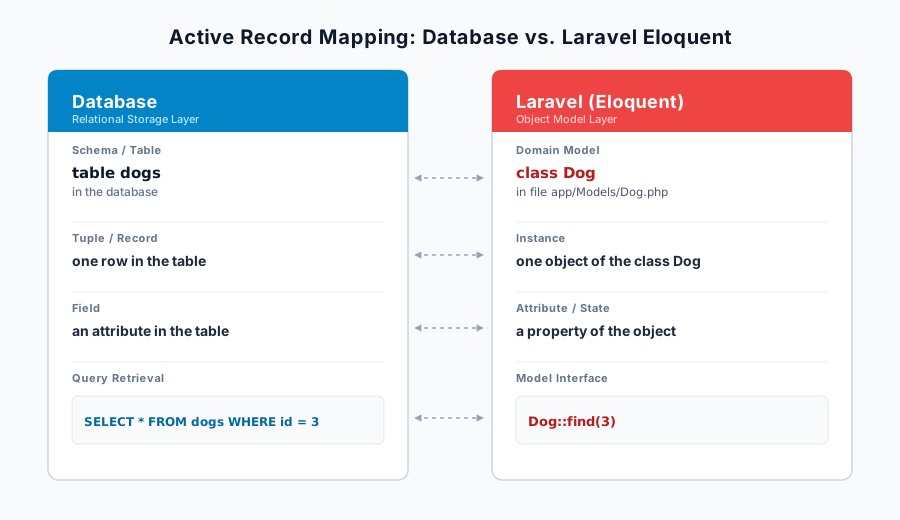
Section titled “Model Basics”Laravel Models are classes that represent Objects from the Domain and at the same time tables in the database.
All the models in a Laravel project inherit from Model. Model implments the methods for the ActiveRecord pattern.
The files are found in app/Models/, this example is called app/Models/Dog.php:
<?phpnamespace App\Models;
use Illuminate\Database\Eloquent\Model;
class Dog extends Model{    public function bark(): string    {        return "woof";    }}
The Mapping
Section titled “The Mapping”A quick overview of how Objects and Database relate when using Eloquent in Laravel:
Working with the model in tinker
Section titled “Working with the model in tinker”You can use tinker to work with
the model interactively. This is similar to the PHP interactive shell php -a
but with your Laravel app already loaded.
Any changes you make are really written to the development database!
php artisan tinker
Finding a model
Section titled “Finding a model”The database table always has a primary key id. You can use this
key and the static method find to find a specific record:
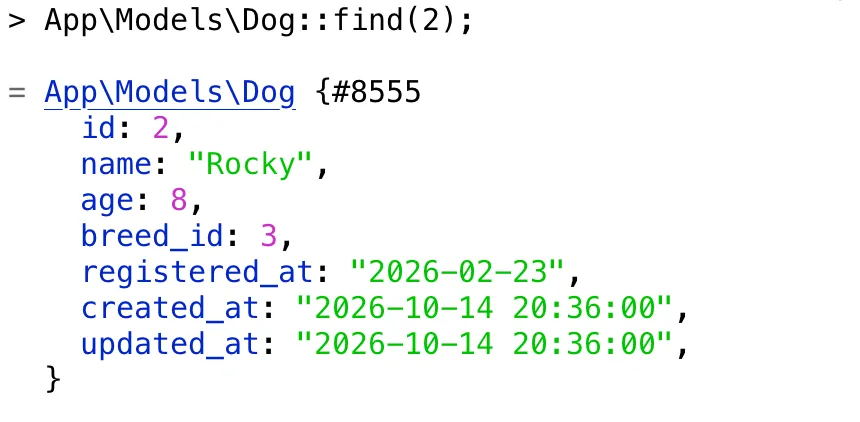
find() returns one value.
After the equal sign (=) tinker shows this value,
it is an object of class Dog. Tinker prints out the properties of this object.
See SQL
Section titled “See SQL”To better understand the ORM, you can add this code to tinker once:
DB::listen(function ($query) { echo $query->sql . ' [' . implode(', ', $query->bindings) . "]\n";});
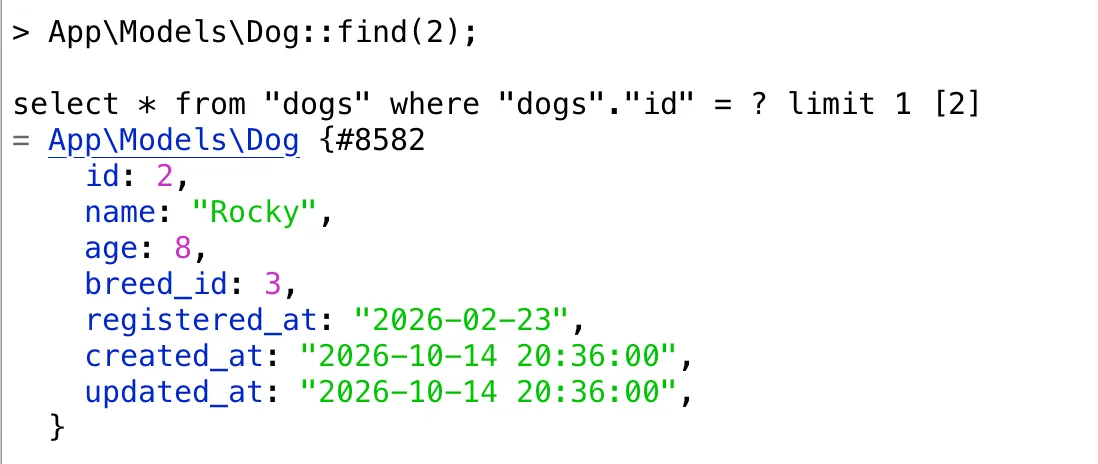
Now, when you type in Dog::find(2) you will also get the SQL-Query that was sent to the database.
In this case
select * from "dogs" where "dogs"."id" = ? limit 1. You can see
that prepared statements are used, and that a limit is always placed on the number
of answers.
The binding is also shown in brackets after the Query: in place of the first questionmark, the value 2 will be filled in.
Accessing the properties
Section titled “Accessing the properties”You can access the properties of the model object as if it were an array or through property names:
> $t = App\Models\Dog::find(3)= App\Models\Dog { id: 3, ... }> $t->name= "Daisy"> $t['name']= "Daisy"> $t->age= 2> $t['age']= 2CRUD = Create, Read, Update, Delete
Section titled “CRUD = Create, Read, Update, Delete”Let’s see how Eloquent implements the four important capabilities of persistence:
Create
Section titled “Create”> $t = new \App\Models\Dog();> $t->name = "Spot";> $t->save();Illuminate\Database\QueryException SQLSTATE[23502]: Not null violation: 7 ERROR:null value in column "age" of relation "dogs" violates not-null constraintWith new you create a new object just in memory. It is not stored in the
database yet and does not have an id yet. You can set its properties.
The save method tries to save it to the database.
Here we hit an error.
Create Successfully
Section titled “Create Successfully”If you set all the properties the save() method will succeed:
> $t = new \App\Models\Dog();> $t->name = "Spot";> $t->age = 1;> $t->registered_at = '2026-10-01';> $t->save();= trueAfter the first save you will also be able do access the id of the model:
> $t->id= 18Create with mass assignment
Section titled “Create with mass assignment”There is also a static method create(). It takes all
the properties as an associative array as it’s argument.
But it cannot be used just yet:
> $t = \App\Models\Dog::create([. 'name' => 'Spot',. 'age' => 1,. 'registered_at' => '2026-10-01',. ]); Illuminate\Database\Eloquent\MassAssignmentException Add [name] to fillable property to allow mass assignment on [App\Models\Dog].Create Successfully with mass assingment
Section titled “Create Successfully with mass assingment”Add the following to the model class to allow this:
protected $fillable = [ 'name', 'age', 'registered_at' ];Now the create() method succeeds:
% php artisan tinker                                                                                               dogs-and-breedsPsy Shell v0.12.24 (PHP 8.5.11 — cli) by Justin HilemanNew PHP manual is available (latest: 3.0.1). Update with `doc --update-manual`> $t = \App\Models\Dog::create([                                                                                                                                      'name' => 'Spot',                                                                                                                                                 'age' => 1,                                                                                                                                                       'registered_at' => '2026-10-01',                                                                                                                              ]);
= App\Models\Dog {#8623 name: "Spot", age: 1, registered_at: "2026-10-01", updated_at: "2026-10-14 22:44:38", created_at: "2026-10-14 22:44:38", id: 19, }There are many ways to read data from the database. We already saw the class method find which
uses the primary key and always returns one object. The method where is used for more general select - where SQL statements.
use \App\Models\Dog;$t1 = Dog::find(3);$t2 = Dog::where('registered_at', '>', '2026-08-01')->get();$t3 = Dog::where('name', 'Spot')->get();Collection
Section titled “Collection”In tinker you can see the return values: where returns several records from the database.
It turns them into objects of class Dog, and stores them in an Eloquent Collection.
> $dogs = Dog::where('registered_at', '>', '2026-08-01')->get();
= Illuminate\Database\Eloquent\Collection { ...#8155    all: [      App\Models\Dog {#8151        id: 18,        name: "Spot",        age: 1,        registered_at: "2026-10-01",        created_at: "2026-10-14 22:35:31",        updated_at: "2026-10-14 22:35:31",      },      App\Models\Dog {#8152        id: 19,        name: "Spot",        age: 1,        registered_at: "2026-10-01",        created_at: "2026-10-14 22:44:38",        updated_at: "2026-10-14 22:44:38",      },    ],  }
Using a Collection
Section titled “Using a Collection”When you get a colleciton, you can use ->first(), ->last(), or loop over it with foreach:
$firstDog = $dogs->first();$lastDog = $dogs->last();foreach ($dogs as $dog) { echo "Dog #{$dog->id}: {$dog->name}, age {$dog->age}\n";}Update
Section titled “Update”With update - as with new before - we see the difference between the
object in memory ($t) which can be changed and the object in the database
which is only changed when $t is saved back to the database.
$t = Dog::find(3);$t->name = "the destroyer of worlds";$t->save();If you inspect the SQL you can see that the UPDATE statement really
only changes the one changed attribute.
Plus the property updated_at is automatically set.
update "dogs" set "name" = ?, "updated_at" = ? where "id" = ? [the destroyer of worlds, 2026-10-14 22:53:05, 3]Delete
Section titled “Delete”To delete both the object in memory and in the database use delete.
$t = Dog::find(3);$t->delete();// delete from "dogs" where "id" = ? [4]Destroy
Section titled “Destroy”There is also a static method destroy(). Using this you don’t have
to load the model into memory first to delete it from the database:
Dog::destroy(3);// delete from "dogs" where "id" = ? [3]
Dog::destroy([1, 2, 5]);// delete from "dogs" where "id" in (1, 2, 5)
Chaining Eloquent methods
Section titled “Chaining Eloquent methods”Let’s look at the example of using where again: the return value is a query builder that supports method chaining:
> $t3 = Dog::where('age', 2)
= Illuminate\Database\Eloquent\Builder {#8568    +pendingAttributes: [],  }
This class also supports all the Eloquent query methods. This means
we can chain several wheres together. Eloquent can combine them
into a complete SQL statement:
tinker> $young_dogs = Dog::where('created_at', '>', '2023-10-21')->where('age', 2)->get();// select * from "dogs" where "created_at" > ? and "age" = ? [2023-10-21, 2]= Illuminate\Database\Eloquent\Collection { ... }More Methods
Section titled “More Methods”In fact there are many more methods we might want to use for chaining:
Dog::limit(3)->get();Dog::orderBy('name')->get();Dog::select('created_at', 'name', 'age')->get();Dog::where('created_at', '>', '2023-10-21')->where('name', 'Spot')->orderBy('age')->limit(3)->get();See SQL
Section titled “See SQL”You can use the method toSql instead of get to see the SQL Statement produced by the chained methods:
> Dog::where('created_at', '>', '2023-10-21')->where('name', 'Spot')->orderBy('age')->limit(3)->toSql();= "select * from \"dogs\" where \"created_at\" > ? and \"name\" = ? order by \"age\" asc limit 3"The order of the methods is not relevant. You can also save an intermediate step to a variable, and then chain more methods to that variable later on:
> $query = Dog::where('created_at', '>', '2020-10-01')->orderBy('age')->limit(3);= Illuminate\Database\Eloquent\Builder> $query->select('created_at', 'name', 'age')->where('name', 'Ash')->toSql();= "select \"created_at\", \"name\", \"age\" from \"dogs\" where \"created_at\" > ? and \"name\" = ? order by \"age\" asc limit 3"Write plain SQL
Section titled “Write plain SQL”There are several methods that let you use SQL directly, and that still give you Eloquent Collections or Dog models as return values:
$new_dogs_by_age = $db->select('SELECT * FROM dogs WHERE registered_at > ? ORDER BY age DESC', ['2026-01-01']);And if you don’t want a Model object at all, you can use the database as $db directly:
$db = app('db'); // to get $db in tinker$results =$db->select("SELECT EXTRACT(YEAR FROM registered_at)::int AS year, AVG(age) AS average_ageFROM dogsWHERE registered_at IS NOT NULLGROUP BY EXTRACT(YEAR FROM registered_at)ORDER BY year ASC");foreach($age_stats as $line) { echo "of the dogs registered in year $line->year" echo " the average age was $line->average_age\n";}Final Quiz
Section titled “Final Quiz”Which data-access pattern does Laravel use by default?
- DataMapper
- ActiveRecord
- Repository
- Unit of Work
Where do Laravel models live, and what do they extend?
- In
database/models/, extendingEloquent - In
app/, extendingActiveRecord - In
app/Http/Models/, extendingDatabase - In
app/Models/, extendingModel
What does Dog::find(2) return?
- A single
Dogobject, found by its primary keyid - A Collection containing every matching row
- A query builder you still have to call
->get()on - The raw SQL string for the lookup
You run new Dog(), set only name = "Spot", and call save() while age is a NOT NULL column. What happens?
- The dog is saved with
agedefaulting to 0 - A
QueryExceptionis thrown — a not-null violation onage -
save()silently returnsfalseand nothing is stored - A
MassAssignmentExceptionis thrown
Dog::create([...]) throws a MassAssignmentException. What fixes it?
- Call
save()aftercreate() - Switch from Postgres to SQLite
- Wrap the array in
DB::listen(...) - Add the columns to
protected $fillableon the model
What does Dog::where('name', 'Spot')->get() return?
- A single
Dogobject, likefind() - A plain PHP array of arrays
- An Eloquent Collection of
Dogobjects - A query builder waiting for another
->get()
You load a dog, change only its name, and save(). Which columns does the UPDATE change?
- Only
nameplusupdated_at, which is set automatically - Every column of the row, to be safe
- Only
name, andupdated_atis left untouched - Only
updated_at;nameis changed in memory only
What is the difference between $t->delete() and Dog::destroy(3)?
-
delete()is static;destroy()needs a loaded model -
delete()removes a model already loaded in memory;destroy()is static and deletes by id without loading it first - They are identical;
destroy()is just an alias -
destroy()only empties the table, it cannot target one row
Which method shows the SQL of a chained query without executing it?
-
->get() -
->first() -
->listen() -
->toSql()
Further reading
Section titled “Further reading”- The Laravel Documentation gives a good introduction to a subject area:
- Laravel Docs: Eloquent: Getting Started
- Laravel Docs: Eloquent: Query Builder
- Use the Laravel API documentation to look up the details:
Answered: 0 / 0 (0%)
Correct: 0 / 0 (0%)